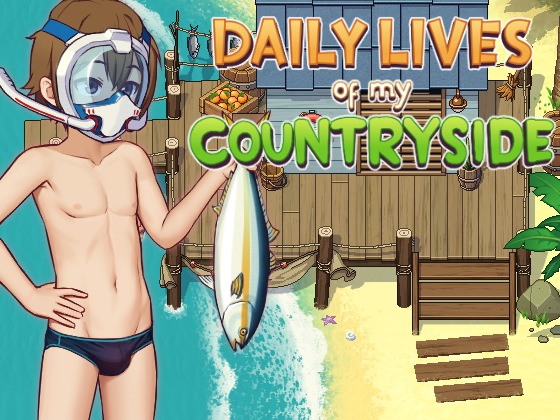
Daily Lives of my Countryside


Game Description:
A boy back to his countryside to continue his study. Let’s follow him to enjoy beautiful rural life.
- Extract and run.
- Android install guide!
• Extract
Don't use Maldives Player's unpack feature, as the program's unpacking function doesn't always work. Unzip the archive yourself.
• Maldives Player
Open Maldives Player. Click Add New Game. Choose the game at the location you extracted the file above. Select the WWW folder
• Tick ONLY:
Use touch compatibility options
Use JavaScript compatibility options
Use file loading compatibility options
Leave everything else unchecked.
• Transfer Saves
Note: if you're using a save file, visit Daisy's Farm to activate the Mobile Version.
Copy the save folder from your old version. Paste it into the new game's WWW folder. Replace if asked.
- Fixed several bugs
- Dual Core Pentium or equivalent Processor.
- Intel HD 2000 or equivalent Graphics.
- 1.5GB of free disk space (Recommended to have twice as much free disk space than this).
Daily Lives of my Countryside - Ongoing - v.0.3.5.1 Links And Mirrors
About The Game: Daily Lives of my Countryside is a porn game made on RPGM game engine. This game is rated M and meant for adults with explicit contents and strong language. It is advised to read the tags to get an idea about the game. The current available version is v.Daily Lives of my Countryside. THe contents of the game is Uncensored. Daily Lives of my Countryside is developed and distributed by Milda Sento, Please support Milda Sento if want the development of Daily Lives of my Countryside game going or want to see more new games from them in future. The download links are crawled and gathered from various public sites. We do not host/modify or alter the contents. The uploader is responsible for the DMCA.
Daily Lives of my Countryside's latest build v.0.3.5.1 is available in Windows, Android platforms and currently Ongoing. We last updated this game in July 19, 2026.
Daily Lives of my Countryside's latest build v.0.3.5.1 is available in Windows, Android platforms and currently Ongoing. We last updated this game in July 19, 2026.
Walkthrough and Guide
Scene Gallery Mod: FILEKNOT
Scene Gallery Mod Installation:
Scene Gallery Mod Features:
Cheat Tool Explanation:
There's a number of people asking for save files to access scenes and what not, even though they have the tools to make their life easier on their own rather than requesting a save every single time... So here's a brief explaination* (Credit*: yercat ) on how to use the 'Cheat':
1. Use the phone to activate the cheats.
2. Look on the events, what numbers(both affection and the blue numbers) that are required for the event to trigger.
3. Then on the phone too, go to where you can see how many affection points you have, it will let you edit them. Put the numbers needed for the event you want to see and thats all, the scene you want to see should happen(obviously you need to be on the place it happens and talk to the character).
This will allow you to view any scene, but may not work with events that require an item that triggers the scene, you'll need to use a save file editor to add the required items yourself if that's the case. You don't need to be requesting save files if you understand on how to use the cheat
Scene Gallery Mod Installation:
1. Use a clean Daily Lives of My Countryside v0.3.5 (PC) install.
2. Close the game.
3. Extract the zip 'www' folder into the game's main folder (the one with Game.exe and the www folder), letting it merge/overwrite. It adds:
- www/js/plugins/Gallery.js (new)
- www/js/plugins.js (overwrites — original plugin list plus one title screen "Gallery" entry; nothing else changes)
- www/data/GalleryOld3Events.json (new)
- www/img/gallery_thumbs/*.jpg (new — menu preview thumbnails)
4. Launch Game.exe — a Gallery option now appears on the title screen.Your existing saves keep working and are never modified. To uninstall, delete the new files and restore the original plugins.js.
2. Close the game.
3. Extract the zip 'www' folder into the game's main folder (the one with Game.exe and the www folder), letting it merge/overwrite. It adds:
- www/js/plugins/Gallery.js (new)
- www/js/plugins.js (overwrites — original plugin list plus one title screen "Gallery" entry; nothing else changes)
- www/data/GalleryOld3Events.json (new)
- www/img/gallery_thumbs/*.jpg (new — menu preview thumbnails)
4. Launch Game.exe — a Gallery option now appears on the title screen.Your existing saves keep working and are never modified. To uninstall, delete the new files and restore the original plugins.js.
Scene Gallery Mod Features:
- One extra Gallery command on the title screen — nothing else in the game changes.
- 164 adult scenes across 32 characters, in chronological order per character.
- Opens straight onto Daisy; full-screen character picker (arrow keys + Enter, or mouse) listing everyone top-to-bottom, most scenes first.
- A baked-in thumbnail preview for every scene.
- Each scene plays on its real in-game map/background with the actual animations and SFX.
- Scenes auto-return to the gallery when they finish, landing back on the exact character and thumbnail you launched from. Press ESC/right-click to exit a scene at any time.
- Hold Ctrl inside a scene to fast-forward it.
- 100% save-safe: runs in an in-memory sandbox, never writes to your save, no gameplay impact.
- The mod is compatible with the Android version of the game.
- 164 adult scenes across 32 characters, in chronological order per character.
- Opens straight onto Daisy; full-screen character picker (arrow keys + Enter, or mouse) listing everyone top-to-bottom, most scenes first.
- A baked-in thumbnail preview for every scene.
- Each scene plays on its real in-game map/background with the actual animations and SFX.
- Scenes auto-return to the gallery when they finish, landing back on the exact character and thumbnail you launched from. Press ESC/right-click to exit a scene at any time.
- Hold Ctrl inside a scene to fast-forward it.
- 100% save-safe: runs in an in-memory sandbox, never writes to your save, no gameplay impact.
- The mod is compatible with the Android version of the game.
Cheat Tool Explanation:
There's a number of people asking for save files to access scenes and what not, even though they have the tools to make their life easier on their own rather than requesting a save every single time... So here's a brief explaination* (Credit*: yercat ) on how to use the 'Cheat':
1. Use the phone to activate the cheats.
2. Look on the events, what numbers(both affection and the blue numbers) that are required for the event to trigger.
3. Then on the phone too, go to where you can see how many affection points you have, it will let you edit them. Put the numbers needed for the event you want to see and thats all, the scene you want to see should happen(obviously you need to be on the place it happens and talk to the character).
This will allow you to view any scene, but may not work with events that require an item that triggers the scene, you'll need to use a save file editor to add the required items yourself if that's the case. You don't need to be requesting save files if you understand on how to use the cheat